SerpZen
Monitor keyword positions, understand ranking changes, and compare competitors from one focused SEO workspace.
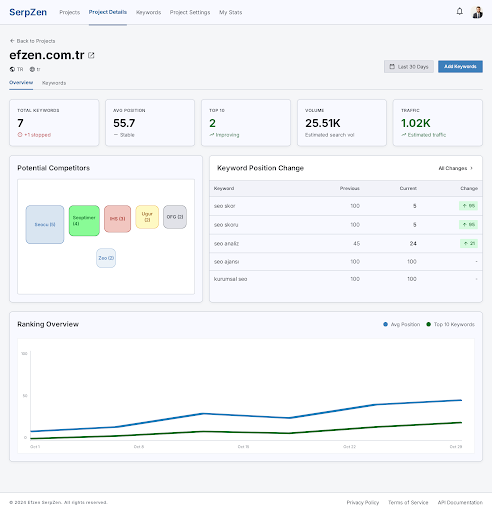
SEO monitoring workspace
Everything needed to act on rankings
SerpZen keeps daily position data, competitor context, and keyword workflows in the same operational view.
Daily rank tracking
Track keyword positions by country and language, review movements, and retry failed checks.
Competitor visibility
Compare your rankings with domains appearing across the same search results.
Historical analysis
Inspect position history, rising and falling keywords, and project-level performance trends.
Reports and exports
Turn monitored keyword data into practical reports and exportable working sets.
Actionable changes
Surface meaningful ranking changes and failed checks without losing the underlying detail.
Straightforward workflow
From project setup to daily decisions
Create a project, add the terms that matter, connect Search Console when needed, and review current and historical changes.
- 1Create a project with its domain, country, and language.
- 2Add keywords manually, by CSV, or from suggestions.
- 3Review daily positions, failures, competitors, and history.
Plans that scale with your tracking workload
Choose limits for projects, keywords, and search credits inside your account. Your current limits stay visible before any change.